
Kungsoft Support Center
No matter you are free, home or commercial users, you'll get fast and professional help from our support team. For any questions, just send an email to [email protected] but before doing this, we recommend you reading the FAQs.
Purchase FAQs
Is the ordering safe?
Your order is 100% secure. You will be connected to the SSL SECURE page to enter your credit-card information safely. All information will be encrypted before transmission to prevent possible interception by a third party. It was designed to provide government level security for your credit card transactions.
When will I get the full product after ordering?
You will receive your full version download URL and registration help information within several minutes after your purchase. Please remember to check all email box.
How many payment types?
We accept several types of payment: Credit Card, PayPal, Bank/Wire Transfer, Check/Money Order, Fax, Invoice. All the prices are in US Dollars.
How to contact RegNow? (About purchase issue)
Phone Order Line - available 24/7
U.S. and Canada: 1-877-353-7297 International: 1-(952)646-5331
Fax Order Line - available 24/7
US Toll-Free Fax Number: 1-800-442-3172 International Fax Number: +1952-646-5604
Postal Mail address: RegNow/Digital River 9625 West 76th Street Eden Prairie, MN 55344 United States of America
Contact RegNow.com via customer service form.
Can I request refund?
We offer a 30-day money back guarantee on the purchase of any licenses that we sell. If the product you purchased cannot help you, simply request a refund by emailing [email protected]. Please provide your order ID if you want to request a refund.
Product FAQs
Why and how to check disk partition?
The partitions with error files could not be converted to FAT32, so check partition with "chkdsk.exe" will find out the mistakes and fix them. Steps:
- Press "Windows" and "R" keys on keyboard, input "cmd" and then press "Enter".
- Enter "chkdsk.exe X:/f": to start partition checking and fixing. (X is the partition you want to check, such as D and E)
Why NTFS partition with single file larger than 4GB can not be converted to FAT32?
Due to Microsoft Windows FAT32 file system limitation, FAT32 partition cannot support single file that is larger than 4GB. If there is such large file, please transfer it to another NTFS partition before converting.
How much time it should be taken to finish the conversion?
It depends on the number and total size of the files on NTFS partition. Generally speaking, a partition with 40GB data costs 10 to 20 minutes, a partition without any data just costs few seconds.
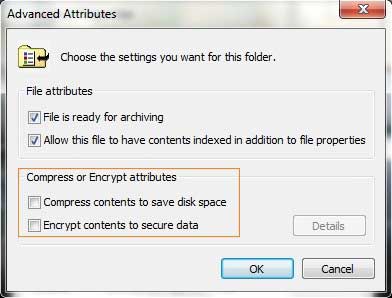
How to remove compressed and encrypted attribute?
Only NTFS file system has the special feature to encrypt the files in NTFS partition, so when you converting a NTFS partition with such files, "NTFS to FAT32 Editor" will prompt an message, such as "The file 'XX.XX" contains Compressed and Encrypted attribute, please remove these attributes and retry".
Steps to remove Compressed and Encrypted attributes:
- Open "My Computer" and the partition with file "XX.XX" (such as family.doc, boy.jpg).
- Right click file "XX.XX" and select "Properties" > "Advanced..."
- In "Advanced Attributes" window, untick the check-box of "Compress contents to save disk space" and "Encrypt contents to secure data".
View video guide how to convert NTFS to FAT32 and vice versa.

 Awards

 Editors Reviews

As a file system converting tool, NTFS to FAT32 Editor helps you easily convert NTFS to FAT32 and vice versa without losing data.
 NTFS to FAT32 Editor is the best choice when you need to convert Windows disk partition without data loss, working fast and easily.
 Customer Reviews
"Thanks for making it so easy, best software purchase I've ever made."
- Mark (United States)
"I cannot believe how fast it help you convert my external disk NTFS partition to FAT32."
- Adrian (Australia)
"Easy, fast, NO.1 file system converter,I like it."
- Eddie (United Kingdom)
 Fast & Safe & Money back
 |
Fast Delivery Full version download link will be sent to your email automatically within several minutes. CD and Extended download service are optional. |
 |
Customer all over the world We have 400000+ customers worldwide, you'll be satiesfied too. |
 |
Risk Free Shop safely in our secure online store. Your data and personal information are protected by SSL technology. |
 |
30-Day Guarantee We have 30-day money back guarantee, If for any reason you are not satisfied with your purchase, contact us and we will refund 100% of your purchase. |