
How to convert and related FAQs
It is very easy to convert NTFS partition to FAT32, or change/modify FAT12/16/32 to NTFS drive without formatting or losing data, please refer to the guide for how to converting.
Windows file system limitations
- If the NTFS partition contains files larger than 4GB, converting NTFS to FAT32 is not allowed, before converting, please transfer these files to other partition. (FAT32 cannot handle single files larger than 4GB)
- System NTFS partition cannot be converted to FAT32.
- Maximum FAT32 partition is 2TB, so NTFS partitions larger than 2TB cannot be covnerted to FAT32.
- Files compression and encryption is unique feature of NTFS file system, so the NTFS partitions contains such files cannot be converted to FAT32, you need to manually decompress and decrypt.
Product FAQs
Why and how to check disk partition?
The partitions with error files could not be converted to FAT32, so check partition with "chkdsk.exe" will find out and fix the mistakes. Steps:
- Press "Windows" and "R" keys on keyboard, input "cmd" and then press "Enter".
- Input "chkdsk.exe X:/f": to start partition checking and fixing. (X is the partition you want to check, such as D and E)
How to remove compressed and encrypted attribute?
Only NTFS file system has the special feature to encrypt the files in NTFS partition, so when you converting a NTFS partition with such files, "NTFS to FAT32 Editor" will prompt an message, such as "The file 'XX.XX" contains Compressed and Encrypted attribute, please remove these attributes and retry".
Steps to remove Compressed and Encrypted attributes:
- Open "My Computer" and the partition with file "XX.XX" (such as family.doc, boy.jpg).
- Right click file "XX.XX" and select "Properties" > "Advanced..."
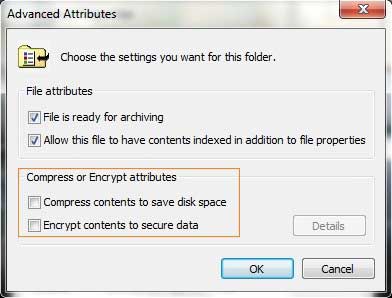
- In "Advanced Attributes" window, untick the check-box of "Compress contents to save disk space" and "Encrypt contents to secure data". Click OK and redo converting.
While running NTFS to FAT32 Editor
- Our product needs to lock the NTFS partition that you want to convert, before converting please close the open files and running applications in this partition.
- Please don't close the program or shut down computer during the conversion.

 Awards

 Editors Reviews

As a file system converting tool, NTFS to FAT32 Editor helps you easily convert NTFS to FAT32 and vice versa without losing data.
 NTFS to FAT32 Editor is the best choice when you need to convert Windows disk partition without data loss, working fast and easily.
 Customer Reviews
"Thanks for making it so easy, best software purchase I've ever made."
- Mark (United States)
"I cannot believe how fast it help you convert my external disk NTFS partition to FAT32."
- Adrian (Australia)
"Easy, fast, NO.1 file system converter,I like it."
- Eddie (United Kingdom)